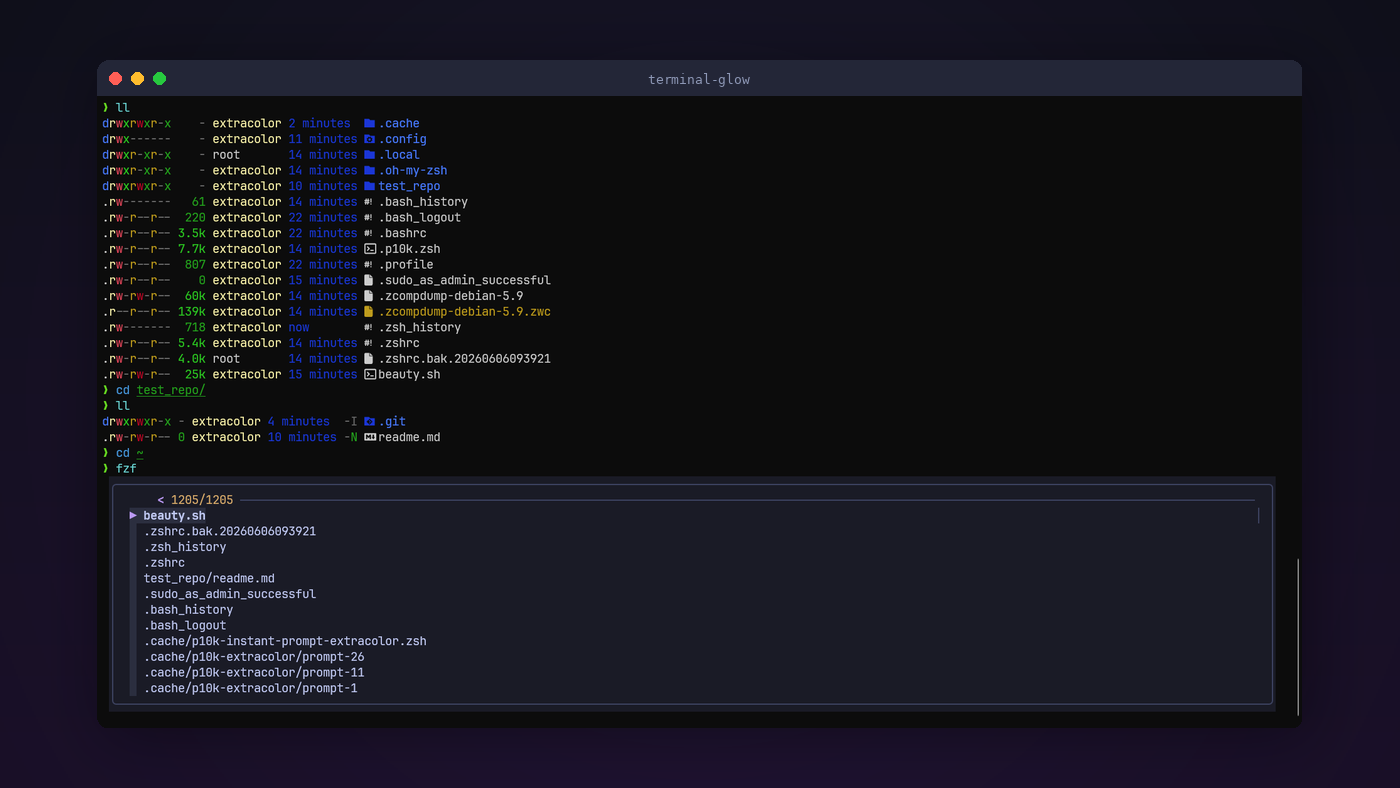
I spend most of my day SSH’d into servers. For years that meant staring at a white-on-black PuTTY window, squinting at walls of text, and constantly running git status because my prompt told me absolutely nothing. One day I decided to fix that for good.
This guide walks through the full setup, both the server side and the SSH client side, to get a terminal that is genuinely pleasant to look at and actually useful. Everything here is open source.
Here is what the end result gives you:
- A prompt that changes color and shows branch name, dirty state, and ahead/behind counts the moment you enter a git repo
- Commands light up in cyan as you type them, and turn red if they don’t exist
- Dim ghost suggestions from your command history appear as you type, and you accept them with the right arrow key
- File listings with icons, colors, and git status per file
- Syntax-highlighted file previews instead of plain
catoutput - A fuzzy finder for files and command history
- A color scheme that is easy on the eyes for long sessions
Let’s get into it.
What We Are Installing
There are two sides to this setup.
On the server (the remote Linux machine you SSH into):
- Zsh as the shell, replacing Bash
- Oh My Zsh as the plugin framework
- Powerlevel10k as the prompt theme (this is where the git magic happens)
- zsh-autosuggestions for history-based ghost text
- zsh-syntax-highlighting for live command coloring
- zsh-completions for better tab completion
- eza as a modern replacement for
ls - bat as a modern replacement for
cat - fd as a modern replacement for
find - ripgrep as a modern replacement for
grep - fzf as a fuzzy finder for everything
On your local machine (where you sit and type):
- A terminal that supports true color (24-bit) and Unicode
- The JetBrains Mono Nerd Font (for the icons in the prompt)
Step 1: Ditch PuTTY
I know, I know. PuTTY has been the go-to SSH client forever. But it was designed in a 256-color world, and that limitation makes everything look washed out no matter what you do on the server side. Switching your SSH client is the single biggest visual upgrade you can make.
Option A: Windows Terminal (Recommended)
Windows Terminal is open source (MIT license), built into Windows 11, and available for Windows 10 from the Microsoft Store or from the GitHub releases page. It has tabs, GPU-rendered text, full true color support, and excellent font rendering.
It uses the OpenSSH client that already ships with Windows 10 and 11, so connecting to a server is just:
ssh user@your-server.com
No extra setup needed for basic SSH.
Option B: Alacritty
If privacy is your top priority, Alacritty is the one. Written in Rust, Apache 2.0 license, zero telemetry, GPU-accelerated. It is minimal by design and does one thing well.
Install it from the releases page or via winget:
winget install Alacritty.Alacritty
Step 2: Install the Nerd Font
This is the step people forget and then wonder why they see little boxes instead of icons. The font has to be installed on your local machine, the one you are sitting in front of. Not the server.
Download JetBrains Mono from nerdfonts.com, extract the zip, select all the .ttf files, right-click, and choose “Install for all users”.
Then set it as your terminal font:
Windows Terminal: Open Settings (Ctrl+,), go to your profile, and set the font to JetBrainsMono Nerd Font, size 11 or 12.
Alacritty: Create the config file at %APPDATA%\alacritty\alacritty.toml:
[font]
size = 11.0

[font.normal]
family = "JetBrainsMono Nerd Font"
style = "Regular"

[font.bold]
family = "JetBrainsMono Nerd Font"
style = "Bold"

[window]
padding = { x = 12, y = 12 }
opacity = 0.95
Step 3: Apply the Color Scheme
The whole setup uses a Tokyo Night inspired palette. Dark blue-gray background, soft foreground colors, and distinct but not harsh accent colors. Easy on the eyes for long sessions.
For Windows Terminal
Open Settings, click “Open JSON file” at the bottom left, and paste this into the "schemes" array:
{
    "name": "Terminal Glow",
    "background": "#1A1B26",
    "foreground": "#C0CAF5",
    "cursorColor": "#BB9AF7",
    "selectionBackground": "#2A2E3F",
    "black": "#15161E",
    "red": "#F7768E",
    "green": "#9ECE6A",
    "yellow": "#E0AF68",
    "blue": "#7AA2F7",
    "purple": "#BB9AF7",
    "cyan": "#7DCFFF",
    "white": "#A9B1D6",
    "brightBlack": "#414868",
    "brightRed": "#F7768E",
    "brightGreen": "#9ECE6A",
    "brightYellow": "#E0AF68",
    "brightBlue": "#7AA2F7",
    "brightPurple": "#BB9AF7",
    "brightCyan": "#7DCFFF",
    "brightWhite": "#C0CAF5"
}
Then in your SSH profile, set "colorScheme": "Terminal Glow". Here is a full profile example you can drop into the "profiles" list:
{
    "name": "My Server",
    "commandline": "ssh user@your-server.com",
    "colorScheme": "Terminal Glow",
    "font": {
        "face": "JetBrainsMono Nerd Font",
        "size": 11
    },
    "opacity": 95,
    "useAcrylic": true,
    "padding": "12"
}
For Alacritty
Add these colors to your alacritty.toml:
[colors.primary]
background = "#1a1b26"
foreground = "#c0caf5"

[colors.cursor]
cursor = "#bb9af7"
text = "#1a1b26"

[colors.selection]
background = "#2a2e3f"
text = "#c0caf5"

[colors.normal]
black   = "#15161e"
red     = "#f7768e"
green   = "#9ece6a"
yellow  = "#e0af68"
blue    = "#7aa2f7"
magenta = "#bb9af7"
cyan    = "#7dcfff"
white   = "#a9b1d6"

[colors.bright]
black   = "#414868"
red     = "#f7768e"
green   = "#9ece6a"
yellow  = "#e0af68"
blue    = "#7aa2f7"
magenta = "#bb9af7"
cyan    = "#7dcfff"
white   = "#c0caf5"
Step 4: Set Up SSH Keys and Config
While we are on the client side, let’s set up key-based auth and an SSH config so you never type long connection strings again.
If you don’t have a key yet:
ssh-keygen -t ed25519 -C "your@email.com"
Copy it to your server:
type $env:USERPROFILE\.ssh\id_ed25519.pub | ssh user@your-server.com "mkdir -p ~/.ssh && cat >> ~/.ssh/authorized_keys"
Then create C:\Users\YourUsername\.ssh\config:
Host *
    ServerAliveInterval 60
    ServerAliveCountMax 3
    AddKeysToAgent yes

Host myserver
    HostName your-server.com
    User root
    IdentityFile C:\Users\YourUsername\.ssh\id_ed25519
Now connecting is just ssh myserver. The Host * block applies keepalive settings to all connections so your sessions don’t drop when you step away.
If you manage many servers, the Host * block handles the shared defaults and each server only needs two lines:
Host web1
    HostName web1.example.com

Host db1
    HostName db1.example.com
    User postgres
Enable the SSH agent so you only type your key passphrase once per session:
Get-Service ssh-agent | Set-Service -StartupType Automatic
Start-Service ssh-agent
ssh-add $env:USERPROFILE\.ssh\id_ed25519
Step 5: Server-Side Setup
Now SSH into your server and install the good stuff. This section assumes Ubuntu or Debian.
Install Zsh and the CLI tools
sudo apt update
sudo apt install -y zsh git curl wget unzip fontconfig bat fd-find ripgrep fzf
On Debian/Ubuntu, bat is installed as batcat and fd is installed as fdfind. Create symlinks so you can use the short names:
sudo ln -sf $(command -v batcat) /usr/local/bin/bat
sudo ln -sf $(command -v fdfind) /usr/local/bin/fd
For eza (the modern ls replacement), check if it is in your repos first:
sudo apt install eza
If that doesn’t work (older Ubuntu/Debian), grab it from GitHub:
EZA_VERSION=$(curl -s https://api.github.com/repos/eza-community/eza/releases/latest | grep '"tag_name"' | head -1 | sed -E 's/.*"v([^"]+)".*/\1/')
ARCH=$(dpkg --print-architecture)
curl -sL "https://github.com/eza-community/eza/releases/download/v${EZA_VERSION}/eza_${ARCH}-unknown-linux-gnu.tar.gz" | sudo tar xz -C /usr/local/bin/
Install Oh My Zsh
sh -c "$(curl -fsSL https://raw.githubusercontent.com/ohmyzsh/ohmyzsh/master/tools/install.sh)"
It will ask if you want to change your default shell to Zsh. Say yes.
Install Powerlevel10k and the plugins
git clone --depth=1 https://github.com/romkatv/powerlevel10k.git \
  ~/.oh-my-zsh/custom/themes/powerlevel10k

git clone --depth=1 https://github.com/zsh-users/zsh-autosuggestions \
  ~/.oh-my-zsh/custom/plugins/zsh-autosuggestions

git clone --depth=1 https://github.com/zsh-users/zsh-syntax-highlighting \
  ~/.oh-my-zsh/custom/plugins/zsh-syntax-highlighting

git clone --depth=1 https://github.com/zsh-users/zsh-completions \
  ~/.oh-my-zsh/custom/plugins/zsh-completions
Configure .zshrc
Back up your current config first:
cp ~/.zshrc ~/.zshrc.bak
Then replace it. Open ~/.zshrc in your editor and paste the full config below. It is long, but every section is commented so you know what each part does.
# Powerlevel10k instant prompt (keep at the very top)
if [[ -r "${XDG_CACHE_HOME:-$HOME/.cache}/p10k-instant-prompt-${(%):-%n}.zsh" ]]; then
  source "${XDG_CACHE_HOME:-$HOME/.cache}/p10k-instant-prompt-${(%):-%n}.zsh"
fi

# Oh My Zsh config
export ZSH="$HOME/.oh-my-zsh"
ZSH_THEME="powerlevel10k/powerlevel10k"

plugins=(
    git
    sudo
    command-not-found
    colored-man-pages
    zsh-autosuggestions
    zsh-syntax-highlighting
    zsh-completions
)

fpath+=${ZSH_CUSTOM:-${ZSH:-~/.oh-my-zsh}/custom}/plugins/zsh-completions/src
source "$ZSH/oh-my-zsh.sh"

# ── Autosuggestions ──
# Subtle gray so suggestions don't compete with what you type
ZSH_AUTOSUGGEST_HIGHLIGHT_STYLE="fg=#636e7b"
ZSH_AUTOSUGGEST_STRATEGY=(history completion)

# ── Syntax highlighting colors ──
typeset -A ZSH_HIGHLIGHT_STYLES
ZSH_HIGHLIGHT_STYLES[command]='fg=cyan,bold'
ZSH_HIGHLIGHT_STYLES[builtin]='fg=cyan'
ZSH_HIGHLIGHT_STYLES[alias]='fg=cyan,bold'
ZSH_HIGHLIGHT_STYLES[function]='fg=cyan'
ZSH_HIGHLIGHT_STYLES[unknown-token]='fg=red'
ZSH_HIGHLIGHT_STYLES[path]='fg=green,underline'
ZSH_HIGHLIGHT_STYLES[globbing]='fg=magenta'
ZSH_HIGHLIGHT_STYLES[single-quoted-argument]='fg=yellow'
ZSH_HIGHLIGHT_STYLES[double-quoted-argument]='fg=yellow'
ZSH_HIGHLIGHT_STYLES[dollar-quoted-argument]='fg=yellow'
ZSH_HIGHLIGHT_STYLES[comment]='fg=#636e7b'
ZSH_HIGHLIGHT_STYLES[arg0]='fg=cyan,bold'
ZSH_HIGHLIGHT_STYLES[default]='fg=#c0caf5'
ZSH_HIGHLIGHT_STYLES[commandseparator]='fg=magenta'
ZSH_HIGHLIGHT_STYLES[redirection]='fg=magenta'
ZSH_HIGHLIGHT_STYLES[reserved-word]='fg=magenta,bold'
ZSH_HIGHLIGHT_STYLES[single-hyphen-option]='fg=#7aa2f7'
ZSH_HIGHLIGHT_STYLES[double-hyphen-option]='fg=#7aa2f7'

# ── Modern CLI tool aliases ──

# eza (modern ls)
if command -v eza &>/dev/null; then
    alias ls='eza --icons --group-directories-first'
    alias ll='eza -la --icons --group-directories-first --git --time-style=relative'
    alias lt='eza -la --icons --tree --level=2 --git'
    alias la='eza -a --icons --group-directories-first'
else
    alias ls='ls --color=auto'
    alias ll='ls -lah --color=auto'
fi

# bat (modern cat)
if command -v bat &>/dev/null; then
    alias cat='bat --paging=never --style=plain'
    alias catn='bat --paging=never'
    alias catf='bat'
    export MANPAGER="sh -c 'col -bx | bat -l man -p'"
    export BAT_THEME="TwoDark"
fi

# fd (modern find)
if command -v fd &>/dev/null; then
    alias find='fd'
fi

# ripgrep (modern grep)
if command -v rg &>/dev/null; then
    alias grep='rg'
fi

# fzf with Tokyo Night colors
if command -v fzf &>/dev/null; then
    if command -v fd &>/dev/null; then
        export FZF_DEFAULT_COMMAND='fd --type f --hidden --follow --exclude .git'
        export FZF_CTRL_T_COMMAND="$FZF_DEFAULT_COMMAND"
        export FZF_ALT_C_COMMAND='fd --type d --hidden --follow --exclude .git'
    fi
    export FZF_DEFAULT_OPTS="
        --height=40% --layout=reverse --border=rounded
        --color=bg+:#2a2e3f,bg:#1a1b26,spinner:#bb9af7,hl:#7aa2f7
        --color=fg:#c0caf5,header:#7aa2f7,info:#e0af68,pointer:#bb9af7
        --color=marker:#9ece6a,fg+:#c0caf5,prompt:#bb9af7,hl+:#7aa2f7
        --color=border:#3b4261
    "
    [[ -f /usr/share/doc/fzf/examples/key-bindings.zsh ]] && \
        source /usr/share/doc/fzf/examples/key-bindings.zsh
    [[ -f /usr/share/doc/fzf/examples/completion.zsh ]] && \
        source /usr/share/doc/fzf/examples/completion.zsh
fi

# ── Directory colors ──
export LS_COLORS="di=1;34:ln=36:so=35:pi=33:ex=1;32:bd=1;33:cd=1;33:su=1;31:sg=1;31:tw=1;34:ow=1;34:*.tar=31:*.gz=31:*.zip=31:*.7z=31:*.jpg=35:*.png=35:*.gif=35:*.svg=35:*.mp3=36:*.mp4=36:*.pdf=33:*.md=37:*.json=37:*.yml=37:*.yaml=37:*.conf=37:*.log=90:*.bak=90:*.tmp=90"

# ── History ──
HISTSIZE=50000
SAVEHIST=50000
HISTFILE="${HOME}/.zsh_history"
setopt HIST_IGNORE_ALL_DUPS HIST_FIND_NO_DUPS HIST_REDUCE_BLANKS
setopt SHARE_HISTORY HIST_VERIFY INC_APPEND_HISTORY

# ── Navigation ──
setopt AUTO_CD AUTO_PUSHD PUSHD_IGNORE_DUPS PUSHD_SILENT

# ── Completion styling ──
zstyle ':completion:*' menu select
zstyle ':completion:*' matcher-list 'm:{a-zA-Z}={A-Za-z}'
zstyle ':completion:*' list-colors "${(s.:.)LS_COLORS}"
zstyle ':completion:*:descriptions' format '%F{yellow}-- %d --%f'
zstyle ':completion:*:warnings' format '%F{red}-- no matches --%f'

# ── Key bindings ──
bindkey '^[[A' history-search-backward
bindkey '^[[B' history-search-forward
bindkey '^[[3~' delete-char
bindkey '^[[H' beginning-of-line
bindkey '^[[F' end-of-line

# ── Handy aliases ──
alias ..='cd ..'
alias ...='cd ../..'
alias mkdir='mkdir -pv'
alias df='df -h'
alias du='du -sh'
alias free='free -h'
alias ports='ss -tulnp'
alias myip='curl -s ifconfig.me && echo'
alias reload='source ~/.zshrc && echo "Reloaded .zshrc"'
alias rm='rm -I'
alias cp='cp -iv'
alias mv='mv -iv'
alias diff='diff --color=auto'
alias ip='ip -color=auto'

# Quick git
alias gs='git status -sb'
alias gl='git log --oneline --graph --decorate -20'
alias gd='git diff'
alias gds='git diff --staged'

# ── Load Powerlevel10k config ──
[[ -f ~/.p10k.zsh ]] && source ~/.p10k.zsh
Configure the Prompt
The easiest way is to run the built-in wizard:
p10k configure
It walks you through a series of visual choices and builds the config for you. Pick the options you like and it writes ~/.p10k.zsh automatically.
If you prefer a pre-made config that gives you a clean, minimal, two-line prompt with full git info, you can grab the one from the install script instead. The key things it sets up:
- Left side: OS icon, current directory, git status
- Right side: last command exit code, execution time, user@host (only in SSH), time
- Branch name in green when clean, amber when dirty, red on conflicts
- Ahead/behind arrows for push/pull status
- Staged, unstaged, and untracked file counts
- Previous prompts collapse to a simple arrow to save screen space
Step 6: Log Out and Back In
Close your SSH session and reconnect. Your new shell should greet you with a clean, colorful prompt. If you see little boxes instead of icons, go back to Step 2 and make sure the Nerd Font is installed on your local machine and set in your terminal app.
Daily Workflow
Here is what changes in your day-to-day work.
Navigating files: Just type ls and you get colored output with icons for each file type, directories grouped at the top. Type ll for a detailed view with git status per file and relative timestamps like “2 hours ago” instead of raw dates. Type lt for a tree view.
Reading files: cat now shows syntax-highlighted output. If you want line numbers, use catn. For the full pager experience with header and line numbers, use catf.
Finding things: Press Ctrl+R for fuzzy search through your command history. Press Ctrl+T for fuzzy file search. Both use a nice floating popup with the same color scheme.
Git repos: The moment you cd into a git repo, the prompt shows the branch name. Make some changes and you immediately see counts for staged, unstaged, and untracked files. The color shifts from green to amber. If you are behind the remote, you see a down arrow with the commit count.
Typo catching: As you type a command, it appears in cyan if it is valid. If you mistype something, it turns red before you even press Enter.
History suggestions: Start typing a command you’ve used before and a dim suggestion appears. Press the right arrow to accept it. This alone saves a huge amount of typing over a day.
Sudo shortcut: Forgot to type sudo? Press Escape twice and it gets prepended automatically.
Quick Reference
| Command | What it does |
|---|---|
ll | Detailed file list with git status and relative timestamps |
lt | Tree view, two levels deep |
gs | Short git status |
gl | Pretty git log, last 20 commits with graph |
catf some-file | View file with syntax highlighting and line numbers |
Ctrl+R | Fuzzy search command history |
Ctrl+T | Fuzzy search files |
reload | Reload .zshrc after editing it |
p10k configure | Re-run the prompt wizard |
ESC ESC | Prepend sudo to current command |
Troubleshooting
Icons are broken (boxes or question marks): The Nerd Font is not installed on your local machine, or your terminal is not using it. Check your terminal’s font settings.
Colors look washed out: Your terminal does not support true color. This is the PuTTY problem. Switch to Windows Terminal or Alacritty.
Prompt is slow in very large git repos: Powerlevel10k is fast, but repos with millions of files can still lag. Add this to your ~/.p10k.zsh:
typeset -g POWERLEVEL9K_VCS_MAX_INDEX_SIZE_DIRTY=10000
Want to go back to bash: Your old .bashrc is untouched. Just run:
chsh -s /bin/bash
That is the whole setup. It takes about 10 minutes to go through and the difference is night and day. Your terminal goes from a wall of white text on black to something that actually communicates useful information through color and structure, without you having to think about it.
The Lazy Way
If you don’t want to go through all the steps manually, here is the complete
install script that does everything in one go. Upload it to your server, make
it executable with chmod +x terminal-glow.sh, and run it with
sudo bash terminal-glow.sh.
A word of caution though. Never blindly paste scripts from the internet into your terminal. Not this one, not any other. Take a few minutes to read through it first and understand what it does. A single script running with sudo has full control over your system. Trust, but verify.
You can grab the full installer script below and upload it to your server.
terminal-glow.sh (click to expand)
#!/usr/bin/env bash
# ============================================================================
#  terminal-glow.sh (v1.1 - fixed)
#  Transform a boring black-and-white terminal into something you actually
#  enjoy staring at for 10 hours a day.
#
#  What this installs:
#    - Zsh (shell)
#    - Oh My Zsh (framework)
#    - Powerlevel10k (theme with gorgeous git integration)
#    - zsh-autosuggestions (ghost-text history suggestions as you type)
#    - zsh-syntax-highlighting (live red/green feedback on commands)
#    - eza (modern ls replacement with colors and icons)
#    - bat (modern cat replacement with syntax highlighting)
#    - fd-find (modern find replacement)
#    - ripgrep (modern grep replacement)
#    - fzf (fuzzy finder for everything)
#    - Custom .zshrc with a hand-tuned aesthetic config
#    - Pre-configured Powerlevel10k prompt (no wizard needed)
#
#  Tested on: Ubuntu 22.04 / 24.04 / 26.04, Debian 11/12
#
#  Usage:
#    As your normal user with sudo access:
#      ./terminal-glow.sh
#
#    Or with sudo (will configure for the invoking user, not root):
#      sudo ./terminal-glow.sh
# ============================================================================

set -euo pipefail

R='\033[0;31m'   G='\033[0;32m'   Y='\033[0;33m'
B='\033[0;34m'   M='\033[0;35m'   C='\033[0;36m'
W='\033[1;37m'   DIM='\033[2m'    RESET='\033[0m'

if [[ -n "${SUDO_USER:-}" ]]; then
    TARGET_USER="$SUDO_USER"
elif [[ $EUID -eq 0 ]]; then
    TARGET_USER="root"
else
    TARGET_USER="$USER"
fi

TARGET_HOME=$(eval echo "~${TARGET_USER}")
TARGET_GROUP=$(id -gn "$TARGET_USER")

banner() {
    echo ""
    echo -e "${C}  ╔══════════════════════════════════════════════╗${RESET}"
    echo -e "${C}  ║${W}      terminal-glow installer v1.1 (fixed)    ${C}║${RESET}"
    echo -e "${C}  ║${DIM}     making your CLI beautiful since today    ${C}║${RESET}"
    echo -e "${C}  ╚══════════════════════════════════════════════╝${RESET}"
    echo ""
}

info()    { echo -e "  ${C}[i]${RESET} $*"; }
ok()      { echo -e "  ${G}[✓]${RESET} $*"; }
warn()    { echo -e "  ${Y}[!]${RESET} $*"; }
fail()    { echo -e "  ${R}[✗]${RESET} $*"; exit 1; }
step()    { echo -e "\n  ${M}───${RESET} ${W}$*${RESET} ${M}───${RESET}"; }

run_as_user() {
    if [[ $EUID -eq 0 && "$TARGET_USER" != "root" ]]; then
        su - "$TARGET_USER" -s /bin/bash -c "$1"
    else
        bash -c "$1"
    fi
}

banner

info "Target user:  ${W}${TARGET_USER}${RESET}"
info "Home dir:     ${W}${TARGET_HOME}${RESET}"

if [[ $EUID -eq 0 && -z "${SUDO_USER:-}" ]]; then
    warn "Running as root directly. Config will be placed in /root."
    warn "If you want this for a regular user, run:  sudo ./terminal-glow.sh"
    echo ""
    read -rp "  Continue as root? [y/N] " ans
    [[ "${ans,,}" == "y" ]] || exit 0
fi

[[ -d "$TARGET_HOME" ]] || fail "Home directory ${TARGET_HOME} does not exist."

# ── Step 1: System packages ──

step "Installing system packages"

SUDO=""
[[ $EUID -ne 0 ]] && SUDO="sudo"

$SUDO apt-get update -qq

PACKAGES=(zsh git curl wget unzip fontconfig bat fd-find ripgrep fzf)

if apt-cache show eza &>/dev/null 2>&1; then
    PACKAGES+=(eza)
    EZA_FROM_APT=true
else
    EZA_FROM_APT=false
fi

$SUDO apt-get install -y -qq "${PACKAGES[@]}" 2>/dev/null
ok "System packages installed"

if command -v batcat &>/dev/null && ! command -v bat &>/dev/null; then
    $SUDO ln -sf "$(command -v batcat)" /usr/local/bin/bat
    ok "Created 'bat' symlink (was batcat)"
fi
if command -v fdfind &>/dev/null && ! command -v fd &>/dev/null; then
    $SUDO ln -sf "$(command -v fdfind)" /usr/local/bin/fd
    ok "Created 'fd' symlink (was fdfind)"
fi

if [[ "$EZA_FROM_APT" == false ]] && ! command -v eza &>/dev/null; then
    info "eza not in repos, installing from GitHub release..."
    EZA_VERSION=$(curl -s https://api.github.com/repos/eza-community/eza/releases/latest \
        | grep '"tag_name"' | head -1 | sed -E 's/.*"v([^"]+)".*/\1/')
    if [[ -n "$EZA_VERSION" ]]; then
        ARCH=$(dpkg --print-architecture)
        curl -sL "https://github.com/eza-community/eza/releases/download/v${EZA_VERSION}/eza_${ARCH}-unknown-linux-gnu.tar.gz" \
            | $SUDO tar xz -C /usr/local/bin/
        ok "eza ${EZA_VERSION} installed"
    else
        warn "Could not fetch eza version, skipping"
    fi
fi

# ── Step 2: Oh My Zsh ──

step "Installing Oh My Zsh"

OMZ_DIR="${TARGET_HOME}/.oh-my-zsh"

if [[ -d "$OMZ_DIR" && -f "$OMZ_DIR/oh-my-zsh.sh" ]]; then
    ok "Oh My Zsh already installed at ${OMZ_DIR}"
else
    [[ -d "$OMZ_DIR" ]] && rm -rf "$OMZ_DIR"

    info "Installing Oh My Zsh for ${TARGET_USER}..."
    run_as_user "export ZSH='${OMZ_DIR}' && export RUNZSH=no && export CHSH=no && \
        sh -c \"\$(curl -fsSL https://raw.githubusercontent.com/ohmyzsh/ohmyzsh/master/tools/install.sh)\" \"\" --unattended"

    if [[ -f "${OMZ_DIR}/oh-my-zsh.sh" ]]; then
        ok "Oh My Zsh installed at ${OMZ_DIR}"
    else
        fail "Oh My Zsh installation failed. ${OMZ_DIR}/oh-my-zsh.sh not found."
    fi
fi

# ── Step 3: Powerlevel10k ──

step "Installing Powerlevel10k theme"

P10K_DIR="${OMZ_DIR}/custom/themes/powerlevel10k"

if [[ -d "$P10K_DIR" && -f "$P10K_DIR/powerlevel10k.zsh-theme" ]]; then
    ok "Powerlevel10k already installed, pulling latest..."
    run_as_user "git -C '${P10K_DIR}' pull -q 2>/dev/null || true"
else
    [[ -d "$P10K_DIR" ]] && rm -rf "$P10K_DIR"
    run_as_user "git clone --depth=1 https://github.com/romkatv/powerlevel10k.git '${P10K_DIR}'"
    if [[ -f "${P10K_DIR}/powerlevel10k.zsh-theme" ]]; then
        ok "Powerlevel10k installed"
    else
        fail "Powerlevel10k clone failed."
    fi
fi

# ── Step 4: Zsh plugins ──

step "Installing Zsh plugins"

CUSTOM_PLUGINS="${OMZ_DIR}/custom/plugins"

install_plugin() {
    local name="$1" repo="$2" dir="${CUSTOM_PLUGINS}/${1}"

    if [[ -d "$dir" && "$(ls -A "$dir" 2>/dev/null)" ]]; then
        ok "${name} already present"
    else
        [[ -d "$dir" ]] && rm -rf "$dir"
        run_as_user "git clone --depth=1 '${repo}' '${dir}'"
        if [[ -d "$dir" && "$(ls -A "$dir" 2>/dev/null)" ]]; then
            ok "${name} installed"
        else
            warn "${name} clone failed. Install manually later."
        fi
    fi
}

install_plugin "zsh-autosuggestions"     "https://github.com/zsh-users/zsh-autosuggestions"
install_plugin "zsh-syntax-highlighting" "https://github.com/zsh-users/zsh-syntax-highlighting"
install_plugin "zsh-completions"         "https://github.com/zsh-users/zsh-completions"

# ── Step 5: Nerd Font ──

step "Installing Nerd Font (JetBrains Mono)"

FONT_DIR="${TARGET_HOME}/.local/share/fonts"
mkdir -p "$FONT_DIR"

if ls "$FONT_DIR"/JetBrains*.ttf &>/dev/null 2>&1; then
    ok "JetBrains Mono Nerd Font already installed"
else
    info "Downloading JetBrains Mono Nerd Font..."
    TMPDIR_FONT=$(mktemp -d)
    if curl -sL "https://github.com/ryanoasis/nerd-fonts/releases/latest/download/JetBrainsMono.tar.xz" \
        | tar xJ -C "$TMPDIR_FONT" 2>/dev/null; then
        cp "$TMPDIR_FONT"/*.ttf "$FONT_DIR/" 2>/dev/null || true
        fc-cache -f "$FONT_DIR" 2>/dev/null
        ok "JetBrains Mono Nerd Font installed"
    else
        warn "Font download failed. Install manually from https://www.nerdfonts.com/font-downloads"
    fi
    rm -rf "$TMPDIR_FONT"
fi

# ── Step 6: Write .zshrc ──

step "Configuring .zshrc"

ZSHRC="${TARGET_HOME}/.zshrc"

if [[ -f "$ZSHRC" ]]; then
    cp "$ZSHRC" "${ZSHRC}.bak.$(date +%Y%m%d%H%M%S)"
    ok "Backed up existing .zshrc"
fi

cat > "$ZSHRC" << 'ZSHRC_EOF'
# ============================================================================
#  .zshrc - terminal-glow configuration
# ============================================================================

if [[ -r "${XDG_CACHE_HOME:-$HOME/.cache}/p10k-instant-prompt-${(%):-%n}.zsh" ]]; then
  source "${XDG_CACHE_HOME:-$HOME/.cache}/p10k-instant-prompt-${(%):-%n}.zsh"
fi

export ZSH="$HOME/.oh-my-zsh"
ZSH_THEME="powerlevel10k/powerlevel10k"

zstyle ':omz:update' mode reminder
zstyle ':omz:update' frequency 14

plugins=(
    git
    sudo
    command-not-found
    colored-man-pages
    zsh-autosuggestions
    zsh-syntax-highlighting
    zsh-completions
)

fpath+=${ZSH_CUSTOM:-${ZSH:-~/.oh-my-zsh}/custom}/plugins/zsh-completions/src
source "$ZSH/oh-my-zsh.sh"

# ── Autosuggestions ──
ZSH_AUTOSUGGEST_HIGHLIGHT_STYLE="fg=#636e7b"
ZSH_AUTOSUGGEST_STRATEGY=(history completion)

# ── Syntax highlighting colors ──
typeset -A ZSH_HIGHLIGHT_STYLES
ZSH_HIGHLIGHT_STYLES[command]='fg=cyan,bold'
ZSH_HIGHLIGHT_STYLES[builtin]='fg=cyan'
ZSH_HIGHLIGHT_STYLES[alias]='fg=cyan,bold'
ZSH_HIGHLIGHT_STYLES[function]='fg=cyan'
ZSH_HIGHLIGHT_STYLES[unknown-token]='fg=red'
ZSH_HIGHLIGHT_STYLES[path]='fg=green,underline'
ZSH_HIGHLIGHT_STYLES[globbing]='fg=magenta'
ZSH_HIGHLIGHT_STYLES[single-quoted-argument]='fg=yellow'
ZSH_HIGHLIGHT_STYLES[double-quoted-argument]='fg=yellow'
ZSH_HIGHLIGHT_STYLES[dollar-quoted-argument]='fg=yellow'
ZSH_HIGHLIGHT_STYLES[comment]='fg=#636e7b'
ZSH_HIGHLIGHT_STYLES[arg0]='fg=cyan,bold'
ZSH_HIGHLIGHT_STYLES[default]='fg=#c0caf5'
ZSH_HIGHLIGHT_STYLES[commandseparator]='fg=magenta'
ZSH_HIGHLIGHT_STYLES[redirection]='fg=magenta'
ZSH_HIGHLIGHT_STYLES[reserved-word]='fg=magenta,bold'
ZSH_HIGHLIGHT_STYLES[single-hyphen-option]='fg=#7aa2f7'
ZSH_HIGHLIGHT_STYLES[double-hyphen-option]='fg=#7aa2f7'

# ── Modern CLI aliases ──

if command -v eza &>/dev/null; then
    alias ls='eza --icons --group-directories-first'
    alias ll='eza -la --icons --group-directories-first --git --time-style=relative'
    alias lt='eza -la --icons --tree --level=2 --git'
    alias la='eza -a --icons --group-directories-first'
    alias l='eza --icons --group-directories-first'
else
    alias ls='ls --color=auto'
    alias ll='ls -lah --color=auto'
    alias la='ls -a --color=auto'
fi

if command -v bat &>/dev/null; then
    alias cat='bat --paging=never --style=plain'
    alias catn='bat --paging=never'
    alias catf='bat'
    export MANPAGER="sh -c 'col -bx | bat -l man -p'"
    export BAT_THEME="TwoDark"
fi

if command -v fd &>/dev/null; then
    alias find='fd'
fi

if command -v rg &>/dev/null; then
    alias grep='rg'
fi

if command -v fzf &>/dev/null; then
    if command -v fd &>/dev/null; then
        export FZF_DEFAULT_COMMAND='fd --type f --hidden --follow --exclude .git'
        export FZF_CTRL_T_COMMAND="$FZF_DEFAULT_COMMAND"
        export FZF_ALT_C_COMMAND='fd --type d --hidden --follow --exclude .git'
    fi
    export FZF_DEFAULT_OPTS="
        --height=40% --layout=reverse --border=rounded
        --margin=0,1 --padding=0,1 --info=inline
        --prompt='  ' --pointer='▶' --marker='✓'
        --color=bg+:#2a2e3f,bg:#1a1b26,spinner:#bb9af7,hl:#7aa2f7
        --color=fg:#c0caf5,header:#7aa2f7,info:#e0af68,pointer:#bb9af7
        --color=marker:#9ece6a,fg+:#c0caf5,prompt:#bb9af7,hl+:#7aa2f7
        --color=border:#3b4261
    "
    [[ -f /usr/share/doc/fzf/examples/key-bindings.zsh ]] && source /usr/share/doc/fzf/examples/key-bindings.zsh
    [[ -f /usr/share/doc/fzf/examples/completion.zsh ]] && source /usr/share/doc/fzf/examples/completion.zsh
fi

# ── Quality of life ──

export LS_COLORS="di=1;34:ln=36:so=35:pi=33:ex=1;32:bd=1;33:cd=1;33:su=1;31:sg=1;31:tw=1;34:ow=1;34:*.tar=31:*.gz=31:*.zip=31:*.7z=31:*.deb=31:*.rpm=31:*.jpg=35:*.png=35:*.gif=35:*.svg=35:*.mp3=36:*.mp4=36:*.mkv=36:*.pdf=33:*.doc=33:*.md=37:*.json=37:*.yml=37:*.yaml=37:*.toml=37:*.conf=37:*.log=90:*.bak=90:*.old=90:*.tmp=90"

HISTSIZE=50000
SAVEHIST=50000
HISTFILE="${HOME}/.zsh_history"
setopt HIST_IGNORE_ALL_DUPS HIST_FIND_NO_DUPS HIST_REDUCE_BLANKS
setopt SHARE_HISTORY HIST_VERIFY INC_APPEND_HISTORY

setopt AUTO_CD AUTO_PUSHD PUSHD_IGNORE_DUPS PUSHD_SILENT

zstyle ':completion:*' menu select
zstyle ':completion:*' matcher-list 'm:{a-zA-Z}={A-Za-z}'
zstyle ':completion:*' list-colors "${(s.:.)LS_COLORS}"
zstyle ':completion:*' special-dirs true
zstyle ':completion:*:descriptions' format '%F{yellow}-- %d --%f'
zstyle ':completion:*:messages' format '%F{purple}-- %d --%f'
zstyle ':completion:*:warnings' format '%F{red}-- no matches --%f'

bindkey '^[[A' history-search-backward
bindkey '^[[B' history-search-forward
bindkey '^[[3~' delete-char
bindkey '^[[H' beginning-of-line
bindkey '^[[F' end-of-line

alias ..='cd ..'
alias ...='cd ../..'
alias ....='cd ../../..'
alias mkdir='mkdir -pv'
alias df='df -h'
alias du='du -sh'
alias free='free -h'
alias ports='ss -tulnp'
alias myip='curl -s ifconfig.me && echo'
alias reload='source ~/.zshrc && echo "Reloaded .zshrc"'
alias cls='clear'

alias diff='diff --color=auto'
alias ip='ip -color=auto'
alias dmesg='dmesg --color=auto'

alias rm='rm -I'
alias cp='cp -iv'
alias mv='mv -iv'

alias gs='git status -sb'
alias gl='git log --oneline --graph --decorate -20'
alias gd='git diff'
alias gds='git diff --staged'

[[ -f ~/.p10k.zsh ]] && source ~/.p10k.zsh
ZSHRC_EOF

ok ".zshrc written"

# ── Step 7: Powerlevel10k config ──

step "Writing Powerlevel10k prompt configuration"

cat > "${TARGET_HOME}/.p10k.zsh" << 'P10K_EOF'
() {
  emulate -L zsh -o extended_glob
  unset -m '(POWERLEVEL9K_*|DEFAULT_USER)~POWERLEVEL9K_GITSTATUS_DIR'

  typeset -g POWERLEVEL9K_MODE='nerdfont-v3'
  typeset -g POWERLEVEL9K_ICON_PADDING=moderate
  typeset -g POWERLEVEL9K_PROMPT_ADD_NEWLINE=true

  typeset -g POWERLEVEL9K_LEFT_PROMPT_ELEMENTS=(os_icon dir vcs prompt_char)
  typeset -g POWERLEVEL9K_RIGHT_PROMPT_ELEMENTS=(status command_execution_time background_jobs context virtualenv node_version time)

  typeset -g POWERLEVEL9K_PROMPT_CHAR_OK_{VIINS,VICMD,VIVIS,VIOWR}_FOREGROUND=76
  typeset -g POWERLEVEL9K_PROMPT_CHAR_ERROR_{VIINS,VICMD,VIVIS,VIOWR}_FOREGROUND=196
  typeset -g POWERLEVEL9K_PROMPT_CHAR_{OK,ERROR}_VIINS_CONTENT_EXPANSION='❯'
  typeset -g POWERLEVEL9K_PROMPT_CHAR_{OK,ERROR}_VICMD_CONTENT_EXPANSION='❮'
  typeset -g POWERLEVEL9K_PROMPT_CHAR_{OK,ERROR}_VIVIS_CONTENT_EXPANSION='V'
  typeset -g POWERLEVEL9K_PROMPT_CHAR_{OK,ERROR}_VIOWR_CONTENT_EXPANSION='▶'
  typeset -g POWERLEVEL9K_PROMPT_CHAR_OVERWRITE_STATE=true
  typeset -g POWERLEVEL9K_PROMPT_CHAR_LEFT_PROMPT_LAST_SEGMENT_END_SYMBOL=''
  typeset -g POWERLEVEL9K_PROMPT_CHAR_LEFT_PROMPT_FIRST_SEGMENT_START_SYMBOL=

  typeset -g POWERLEVEL9K_OS_ICON_FOREGROUND=7
  typeset -g POWERLEVEL9K_OS_ICON_CONTENT_EXPANSION='${P9K_CONTENT}'

  typeset -g POWERLEVEL9K_DIR_FOREGROUND=31
  typeset -g POWERLEVEL9K_SHORTEN_STRATEGY=truncate_to_unique
  typeset -g POWERLEVEL9K_SHORTEN_DELIMITER=
  typeset -g POWERLEVEL9K_DIR_SHORTENED_FOREGROUND=103
  typeset -g POWERLEVEL9K_DIR_ANCHOR_FOREGROUND=39
  typeset -g POWERLEVEL9K_DIR_ANCHOR_BOLD=true
  typeset -g POWERLEVEL9K_DIR_TRUNCATE_BEFORE_MARKER=false
  typeset -g POWERLEVEL9K_SHORTEN_DIR_LENGTH=1
  typeset -g POWERLEVEL9K_DIR_MAX_LENGTH=60
  typeset -g POWERLEVEL9K_DIR_MIN_COMMAND_COLUMNS=40
  typeset -g POWERLEVEL9K_DIR_MIN_COMMAND_COLUMNS_PCT=50
  typeset -g POWERLEVEL9K_DIR_HYPERLINK=false
  typeset -g POWERLEVEL9K_DIR_SHOW_WRITABLE=v3
  typeset -g POWERLEVEL9K_DIR_NOT_WRITABLE_FOREGROUND=203
  typeset -g POWERLEVEL9K_DIR_CLASSES=()

  typeset -g POWERLEVEL9K_VCS_BRANCH_ICON=' '
  typeset -g POWERLEVEL9K_VCS_UNTRACKED_ICON='?'
  typeset -g POWERLEVEL9K_VCS_CLEAN_FOREGROUND=76
  typeset -g POWERLEVEL9K_VCS_MODIFIED_FOREGROUND=178
  typeset -g POWERLEVEL9K_VCS_UNTRACKED_FOREGROUND=39
  typeset -g POWERLEVEL9K_VCS_CONFLICTED_FOREGROUND=196
  typeset -g POWERLEVEL9K_VCS_LOADING_FOREGROUND=244
  typeset -g POWERLEVEL9K_VCS_MAX_INDEX_SIZE_DIRTY=-1
  typeset -g POWERLEVEL9K_VCS_{STAGED,UNSTAGED,UNTRACKED,CONFLICTED,COMMITS_AHEAD,COMMITS_BEHIND}_MAX_NUM=-1

  typeset -g POWERLEVEL9K_VCS_VISUAL_IDENTIFIER_EXPANSION=
  typeset -g POWERLEVEL9K_VCS_CONTENT_EXPANSION='${$((my_git_formatter(1)))+${my_git_format}}'
  typeset -g POWERLEVEL9K_VCS_LOADING_CONTENT_EXPANSION='${$((my_git_formatter(0)))+${my_git_format}}'
  typeset -g POWERLEVEL9K_VCS_{CLEAN,MODIFIED,UNTRACKED,CONFLICTED,LOADING}_CONTENT_EXPANSION='${$((my_git_formatter($1)))+${my_git_format}}'

  function my_git_formatter() {
    emulate -L zsh
    if [[ -n $P9K_CONTENT ]]; then
      typeset -g my_git_format=$P9K_CONTENT
      return
    fi
    local clean='%76F' modified='%178F' untracked='%39F' conflicted='%196F' meta='%244F'
    local res
    if [[ -n $VCS_STATUS_LOCAL_BRANCH ]]; then
      local branch=${(V)VCS_STATUS_LOCAL_BRANCH}
      (( $#branch > 32 )) && branch[13,-13]="…"
      res+="${clean} ${branch//\%/%%}"
    elif [[ -n $VCS_STATUS_TAG ]]; then
      local tag=${(V)VCS_STATUS_TAG}
      (( $#tag > 32 )) && tag[13,-13]="…"
      res+="${meta}#${tag//\%/%%}"
    else
      res+="${meta}@${VCS_STATUS_COMMIT[1,8]}"
    fi
    [[ -n ${VCS_STATUS_REMOTE_BRANCH:#$VCS_STATUS_LOCAL_BRANCH} ]] && res+="${meta}:${(V)VCS_STATUS_REMOTE_BRANCH//\%/%%}"
    (( VCS_STATUS_COMMITS_BEHIND )) && res+=" ${clean}⇣${VCS_STATUS_COMMITS_BEHIND}"
    (( VCS_STATUS_COMMITS_AHEAD && !VCS_STATUS_COMMITS_BEHIND )) && res+=" "
    (( VCS_STATUS_COMMITS_AHEAD )) && res+="${clean}⇡${VCS_STATUS_COMMITS_AHEAD}"
    (( VCS_STATUS_STASHES )) && res+=" ${clean}*${VCS_STATUS_STASHES}"
    [[ -n $VCS_STATUS_ACTION ]] && res+=" ${conflicted}${VCS_STATUS_ACTION}"
    (( VCS_STATUS_NUM_CONFLICTED )) && res+=" ${conflicted}~${VCS_STATUS_NUM_CONFLICTED}"
    (( VCS_STATUS_NUM_STAGED )) && res+=" ${modified}+${VCS_STATUS_NUM_STAGED}"
    (( VCS_STATUS_NUM_UNSTAGED )) && res+=" ${modified}!${VCS_STATUS_NUM_UNSTAGED}"
    if (( $1 )); then
      (( VCS_STATUS_NUM_UNTRACKED )) && res+=" ${untracked}?${VCS_STATUS_NUM_UNTRACKED}"
    else
      (( VCS_STATUS_HAS_UNTRACKED )) && res+=" ${untracked}?"
    fi
    typeset -g my_git_format=$res
  }
  functions -M my_git_formatter 2>/dev/null

  typeset -g POWERLEVEL9K_STATUS_EXTENDED_STATES=true
  typeset -g POWERLEVEL9K_STATUS_OK=false
  typeset -g POWERLEVEL9K_STATUS_OK_PIPE=true
  typeset -g POWERLEVEL9K_STATUS_ERROR=true
  typeset -g POWERLEVEL9K_STATUS_ERROR_FOREGROUND=9
  typeset -g POWERLEVEL9K_STATUS_ERROR_VISUAL_IDENTIFIER_EXPANSION='✘'
  typeset -g POWERLEVEL9K_STATUS_ERROR_SIGNAL=true
  typeset -g POWERLEVEL9K_STATUS_ERROR_SIGNAL_FOREGROUND=9
  typeset -g POWERLEVEL9K_STATUS_VERBOSE_SIGNAME=false
  typeset -g POWERLEVEL9K_STATUS_ERROR_SIGNAL_VISUAL_IDENTIFIER_EXPANSION='✘'
  typeset -g POWERLEVEL9K_STATUS_ERROR_PIPE=true
  typeset -g POWERLEVEL9K_STATUS_ERROR_PIPE_FOREGROUND=9
  typeset -g POWERLEVEL9K_STATUS_ERROR_PIPE_VISUAL_IDENTIFIER_EXPANSION='✘'

  typeset -g POWERLEVEL9K_COMMAND_EXECUTION_TIME_THRESHOLD=3
  typeset -g POWERLEVEL9K_COMMAND_EXECUTION_TIME_PRECISION=1
  typeset -g POWERLEVEL9K_COMMAND_EXECUTION_TIME_FOREGROUND=101
  typeset -g POWERLEVEL9K_COMMAND_EXECUTION_TIME_FORMAT='d h m s'
  typeset -g POWERLEVEL9K_COMMAND_EXECUTION_TIME_VISUAL_IDENTIFIER_EXPANSION=

  typeset -g POWERLEVEL9K_BACKGROUND_JOBS_FOREGROUND=37
  typeset -g POWERLEVEL9K_BACKGROUND_JOBS_VISUAL_IDENTIFIER_EXPANSION='⚙'

  typeset -g POWERLEVEL9K_CONTEXT_{DEFAULT,SUDO}_CONTENT_EXPANSION=
  typeset -g POWERLEVEL9K_CONTEXT_ROOT_FOREGROUND=178
  typeset -g POWERLEVEL9K_CONTEXT_{REMOTE,REMOTE_SUDO}_CONTENT_EXPANSION='%n@%m'
  typeset -g POWERLEVEL9K_CONTEXT_{REMOTE,REMOTE_SUDO}_FOREGROUND=180
  typeset -g POWERLEVEL9K_CONTEXT_ROOT_TEMPLATE='%n@%m'

  typeset -g POWERLEVEL9K_VIRTUALENV_FOREGROUND=37
  typeset -g POWERLEVEL9K_VIRTUALENV_SHOW_WITH_PYENV=false
  typeset -g POWERLEVEL9K_VIRTUALENV_{LEFT,RIGHT}_DELIMITER=

  typeset -g POWERLEVEL9K_NODE_VERSION_FOREGROUND=70
  typeset -g POWERLEVEL9K_NODE_VERSION_PROJECT_ONLY=true

  typeset -g POWERLEVEL9K_TIME_FOREGROUND=66
  typeset -g POWERLEVEL9K_TIME_FORMAT='%D{%H:%M}'
  typeset -g POWERLEVEL9K_TIME_UPDATE_ON_COMMAND=false

  typeset -g POWERLEVEL9K_LEFT_SUBSEGMENT_SEPARATOR=' '
  typeset -g POWERLEVEL9K_RIGHT_SUBSEGMENT_SEPARATOR=' '
  typeset -g POWERLEVEL9K_LEFT_SEGMENT_SEPARATOR=''
  typeset -g POWERLEVEL9K_RIGHT_SEGMENT_SEPARATOR=''
  typeset -g POWERLEVEL9K_LEFT_PROMPT_LAST_SEGMENT_END_SYMBOL=''
  typeset -g POWERLEVEL9K_RIGHT_PROMPT_FIRST_SEGMENT_START_SYMBOL=''
  typeset -g POWERLEVEL9K_LEFT_PROMPT_FIRST_SEGMENT_START_SYMBOL=''
  typeset -g POWERLEVEL9K_RIGHT_PROMPT_LAST_SEGMENT_END_SYMBOL=''
  typeset -g POWERLEVEL9K_EMPTY_LINE_LEFT_PROMPT_LAST_SEGMENT_END_SYMBOL=

  typeset -g POWERLEVEL9K_BACKGROUND=
  typeset -g POWERLEVEL9K_{LEFT,RIGHT}_{LEFT,RIGHT}_WHITESPACE=
  typeset -g POWERLEVEL9K_{LEFT,RIGHT}_SUBSEGMENT_SEPARATOR=' '

  typeset -g POWERLEVEL9K_TRANSIENT_PROMPT=always
  typeset -g POWERLEVEL9K_INSTANT_PROMPT=verbose
  typeset -g POWERLEVEL9K_TERM_SHELL_INTEGRATION=true

  (( ! $+functions[p10k] )) || p10k reload
}

(( ${#p10k_config_opts} )) && setopt ${p10k_config_opts[@]}
'builtin' 'unset' 'p10k_config_opts'
P10K_EOF

ok "Powerlevel10k config written"

# ── Step 8: Fix ownership ──

step "Fixing file ownership"

chown "${TARGET_USER}:${TARGET_GROUP}" "${TARGET_HOME}/.zshrc"
chown "${TARGET_USER}:${TARGET_GROUP}" "${TARGET_HOME}/.p10k.zsh"
chown -R "${TARGET_USER}:${TARGET_GROUP}" "${OMZ_DIR}"
[[ -d "${TARGET_HOME}/.local/share/fonts" ]] && \
    chown -R "${TARGET_USER}:${TARGET_GROUP}" "${TARGET_HOME}/.local/share/fonts"
ok "Ownership set to ${TARGET_USER}:${TARGET_GROUP}"

# ── Step 9: Set Zsh as default shell ──

step "Setting Zsh as default shell"

ZSH_PATH=$(command -v zsh)
CURRENT_SHELL=$(getent passwd "$TARGET_USER" | cut -d: -f7)

if [[ "$CURRENT_SHELL" == "$ZSH_PATH" ]]; then
    ok "Zsh is already the default shell"
else
    if chsh -s "$ZSH_PATH" "$TARGET_USER" 2>/dev/null; then
        ok "Default shell changed to Zsh for ${TARGET_USER}"
    else
        warn "Could not change shell automatically."
        info "Run manually:  chsh -s ${ZSH_PATH} ${TARGET_USER}"
    fi
fi

# ── Step 10: Verify installation ──

step "Verifying installation"

ERRORS=0

verify() {
    local label="$1" path="$2"
    if [[ -e "$path" ]]; then
        ok "${label}"
    else
        warn "${label} - NOT FOUND at ${path}"
        ERRORS=$((ERRORS + 1))
    fi
}

verify "Oh My Zsh core"          "${OMZ_DIR}/oh-my-zsh.sh"
verify "Powerlevel10k theme"     "${OMZ_DIR}/custom/themes/powerlevel10k/powerlevel10k.zsh-theme"
verify "zsh-autosuggestions"     "${OMZ_DIR}/custom/plugins/zsh-autosuggestions/zsh-autosuggestions.zsh"
verify "zsh-syntax-highlighting" "${OMZ_DIR}/custom/plugins/zsh-syntax-highlighting/zsh-syntax-highlighting.zsh"
verify "zsh-completions"         "${OMZ_DIR}/custom/plugins/zsh-completions/zsh-completions.plugin.zsh"
verify ".zshrc"                  "${TARGET_HOME}/.zshrc"
verify ".p10k.zsh"               "${TARGET_HOME}/.p10k.zsh"

if [[ $ERRORS -gt 0 ]]; then
    warn "${ERRORS} component(s) missing. Check the warnings above."
else
    ok "All components verified"
fi

# ── Done ──

echo ""
echo -e "  ${G}╔══════════════════════════════════════════════╗${RESET}"
echo -e "  ${G}║${W}            Installation complete!             ${G}║${RESET}"
echo -e "  ${G}╚══════════════════════════════════════════════╝${RESET}"
echo ""
echo -e "  ${W}What was installed:${RESET}"
echo -e "    ${C}Shell:${RESET}   Zsh + Oh My Zsh"
echo -e "    ${C}Theme:${RESET}   Powerlevel10k (pre-configured)"
echo -e "    ${C}Plugins:${RESET} autosuggestions, syntax-highlighting, completions"
echo -e "    ${C}Tools:${RESET}   eza, bat, fd, ripgrep, fzf"
echo -e "    ${C}Font:${RESET}    JetBrains Mono Nerd Font"
echo -e "    ${C}User:${RESET}    ${TARGET_USER}"
echo ""
echo -e "  ${Y}IMPORTANT: You must configure your SSH client too!${RESET}"
echo ""
echo -e "  ${W}1.${RESET} Install ${C}JetBrains Mono Nerd Font${RESET} on your ${W}local machine${RESET}"
echo -e "     Download: ${DIM}https://www.nerdfonts.com/font-downloads${RESET}"
echo ""
echo -e "  ${W}2.${RESET} Set it as the font in your SSH client"
echo -e "     Font name: ${C}JetBrainsMono Nerd Font${RESET} or ${C}JetBrainsMono NF${RESET}"
echo ""
echo -e "  ${W}3.${RESET} Log out and back in (or run ${C}zsh${RESET} to try it now)"
echo ""
echo -e "  ${DIM}Tip: If icons look broken, you need the font on your local machine.${RESET}"
echo -e "  ${DIM}Tip: Run 'p10k configure' to re-customize the prompt interactively.${RESET}"
echo ""