In this article I will try to show ways to remove Google and the services associated with the tech giant from mobile devices (smartphones) running the Android operating system.
Where does the term degoogle come from?
Google is so widespread that its name is both a noun and a verb. But is Google a good thing? Back in 2002, the answer was a definitive “YES”. The verb google was chosen as word of the year by the American Dialect Society. Even more, on January 8th 2010, that same word was chosen as the word of the decade!
Fast forward to today and we have a new verb: degoogle. This is the act of removing everything related to Google from our lives.
Why remove Google from our lives?
Google knows too much about us! From location history, through the microphone and cameras on all devices, including the doorbell camera, the things we search for online, all the way to every topic we are interested in. Everything is tracked and recorded.
Google uses this data to monetise us. This means we are the product, not the customer, even when we pay.
Google works with the government as part of the PRISM surveillance programme! This means they can share our personal data without our consent.
Google has a poor privacy policy for its users. They collect far more personal data than anyone can imagine. Even worse, it is not always clear who has access to it and what all this data is used for. What we know they collect includes:
- Contacts;
- Messages;
- Photos;
- Videos;
- Email;
- Documents we store (on the device or in the cloud);
- Apps used;
- Search history;
- Call history;
- Notification history;
- Ad interactions;
- Videos we watch;
- Where we have been (GPS data);
- Wi-Fi networks nearby;
- Information about other devices nearby;
- Physical activity and sleep;
- Profile photos;
- Unique identifiers;
- Device type;
- Purchase statistics;
- Mobile network information, carrier name and phone number;
- All internet activity/history if we use the Chrome browser with account sync enabled.
Let us not forget that they also have access to the camera (front and rear), microphone and all sensors.
The list has become endless, and there is probably more. Add internet access on top of all that…
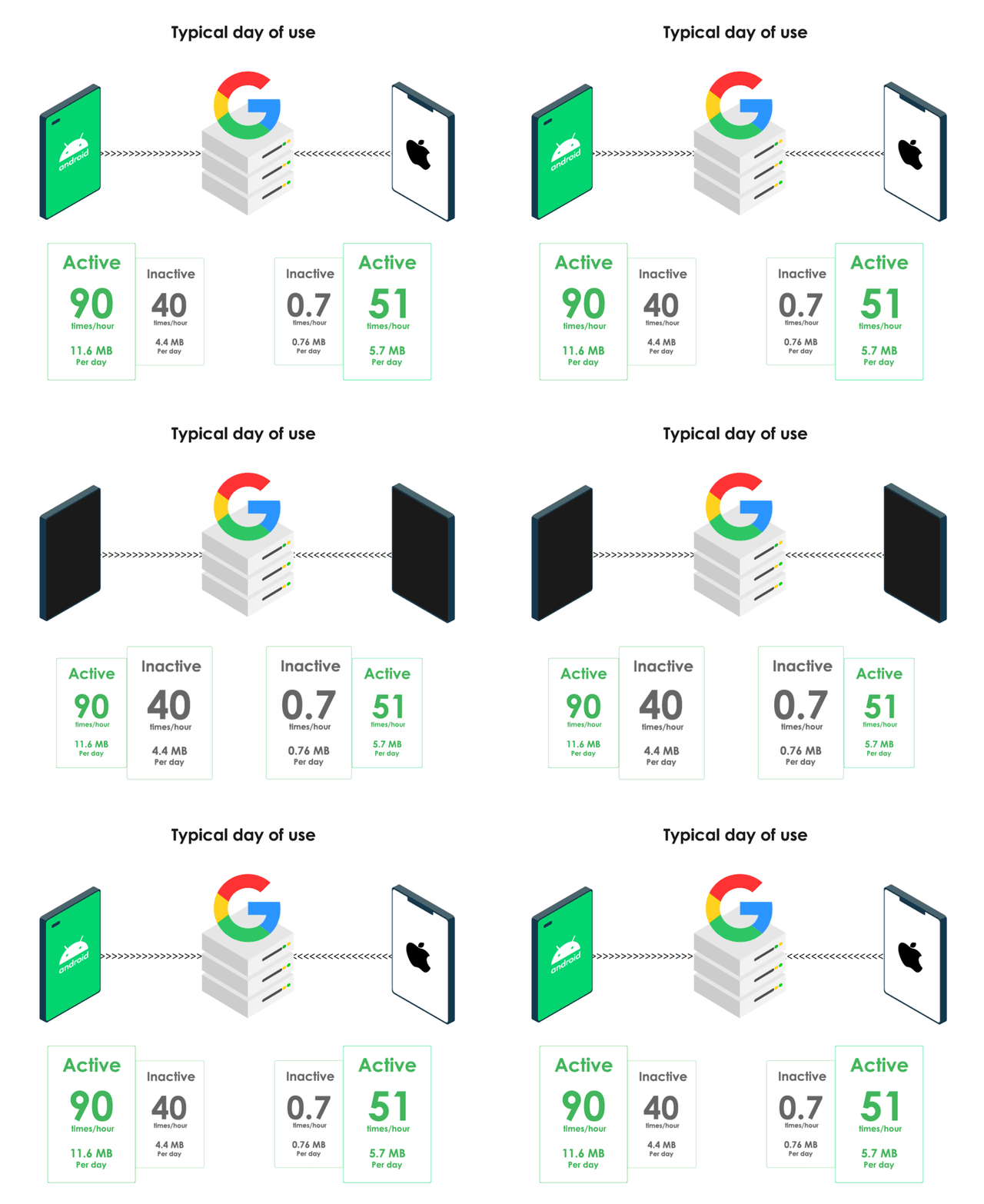 Source: Digital Content Next — Prof. Douglas C. Schmidt, Vanderbilt University, August 2018
The conclusion is that Google knows more about us than we know about ourselves! By default all this data is stored indefinitely.
These are certainly enough reasons to remove Google from our lives.
Devices
As paradoxical as it may sound, the most suitable devices are those made by Google themselves, specifically the Pixel series. In most cases they are not locked, and the software for computer connection and external access is well documented and actively developed.
Devices to avoid
- Carrier-branded — usually locked;
- Without fastboot access or requiring account creation;
- With less than 6GB of RAM;
- With less than 64GB of internal storage;
- Battery capacity below 2000mAh;
- Manufactured before 2017;
- Processors other than Qualcomm or Tensor SoC, such as MediaTek, Exynos, Tegra, OMAP;
- With a kernel version older than 4.4.
Recommended specs
- RAM — at least 8GB;
- Internal storage — at least 128GB;
- SD845 SoC processor or newer;
- Kernel version 4.9 or newer.
Recommended devices
| Manufacturer | Model | Code Name | Released | Supported until |
|---|---|---|---|---|
| Pixel 10 Pro Fold | komodo | 22.08.2024 | 01.08.2032 | |
| Pixel 10 Pro XL | caiman | 04.09.2024 | 01.09.2032 | |
| Pixel 10 Pro | tokay | 22.08.2024 | 01.08.2032 | |
| Pixel 10 | tegu | 10.02.2025 | 01.04.2032 | |
| Pixel 9 Pro XL | komodo | 22.08.2024 | 01.08.2031 | |
| Pixel 9 Pro | caiman | 04.09.2024 | 01.09.2031 | |
| Pixel 9 | tokay | 22.08.2024 | 01.08.2031 | |
| Pixel 9a | tegu | 10.02.2025 | 01.04.2032 | |
| Pixel 8 Pro | husky | 04.10.2023 | 01.10.2030 | |
| Pixel 8 | shiba | 04.10.2023 | 01.10.2030 | |
| Pixel 8a | akita | 14.05.2024 | 01.05.2031 | |
| Pixel Fold | felix | 28.06.2023 | 01.06.2028 | |
| Pixel Tablet | tangorpro | 20.06.2023 | 01.06.2028 | |
| Pixel 7 Pro | cheetah | 13.10.2022 | 01.10.2027 | |
| Pixel 7 | panther | 13.10.2022 | 01.10.2027 | |
| Pixel 7a | lynx | 10.05.2023 | 01.05.2028 | |
| Pixel 6 Pro | raven | 28.10.2021 | 01.10.2026 | |
| Pixel 6 | oriole | 28.10.2021 | 01.10.2026 | |
| Pixel 6a | bluejay | 28.07.2022 | 01.07.2027 | |
Warning!
Avoid the devices listed below. They do not meet the recommended requirements listed above.
- Google Pixel C (dragon)
- Google Nexus 9 (flounder)
- Google Nexus 7 2013 (flox)
OPERATING SYSTEMS
LineageOS
A free and open source operating system for various devices, based on the Android mobile platform.
LineageOS is an operating system for smartphones, tablets and set-top boxes, offering primarily free open source software. It is the successor to CyanogenMod, whose development was discontinued in December 2016.
LineageOS was officially launched on December 23rd 2016, with the source code available on both GitHub and GitLab. In March 2017 it was announced that it had one million users, with the OnePlus One being the most popular device running the OS.
A large portion of all available Android modifications are actually based on this operating system.
DivestOS
A mobile operating system that deviates from the norm. “Reclaim (partial) control over your device”.
Attention!
As of December 2024, development and support for this operating system has been discontinued! Access to the official website has been suspended. Good luck Tavi!
The project was started back in 2014 by Divested Computing Group. The main goal is to extend the life of devices for which manufacturers no longer provide updates. Security and privacy are the priority.
Example:
Google Pixel 2XL (taimen) — manufactured in 2017, officially supported by Google until December 2020 with Android version 11. Thanks to DivestOS, in 2024 the phone continued to receive updates and ran without issues on Android 13.
DivestOS provides a convenient way to block access to the camera and microphone with just one tap in the quick settings. A built-in option to remove a large number of ads and trackers is enabled by default and can be turned off in settings. The number of pre-installed apps is kept to a minimum. The device stores data in encrypted form. To ensure the integrity of the operating system, there is an option to lock the bootloader after installation. Updates are monthly.
On 18.03.2023 in Boston, Massachusetts, at the annual conference of the Free Software Foundation - FSF, the developer of DivestOS - Tad (Tavi, SkewedZeppelin), was awarded for outstanding contribution to the field of free software. More information about the event can be found on the FSF page.
- Website
- Instructions
- Supported devices
- Source code on Github
- Source code on Gitlab
- Source code on Codeberg
GrapheneOS
The private and secure mobile operating system, compatible with Android apps.
If you put security first, GrapheneOS is probably the best choice for you. It is developed as a non-profit, open source project. The developer has taken great care to remove everything unnecessary from the base installation package. This significantly reduces the attack surface for various hacking attempts.
The installation process is incredibly well organised. It is done through a web browser and is almost fully automated. If you have no experience installing alternative operating systems, you will be pleasantly surprised by how smoothly everything goes.
You have the option to enable an unmodified version of Google Play Services. This gives you compatibility with many services that rely on Google Services Framework. What sets this installation apart from standard Android versions is that all Google services run in an isolated environment. They are installed as regular apps, not system apps. For this reason, they do not receive privileged access to the operating system. As a result, you can remove all unnecessary permissions.
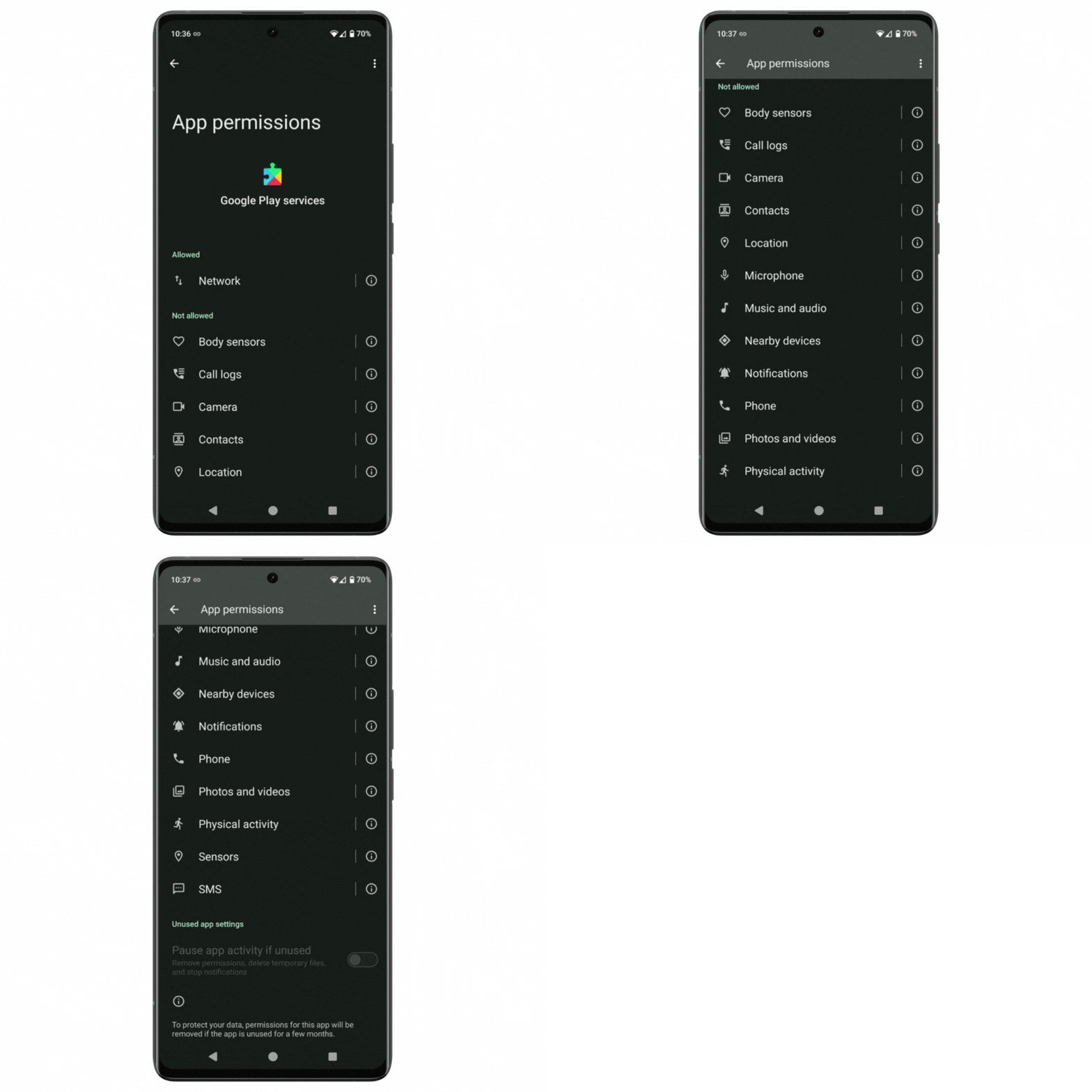 Permissions requested by Google Play Services which on a standard Android version cannot be restricted. This example is from GrapheneOS installed on a Google Pixel 7. Except for internet access, all other permissions are denied.
CalyxOS
Your phone should be personal. Everyone needs a phone. Not everyone wants to be spied on. Reclaim your privacy with CalyxOS.
The operating system is developed by the Calyx Institute. Here too the focus is on privacy and security. Although the installation process is done in terminal mode, this should not put you off. For the most part it runs automatically, which is very helpful for users with no experience installing alternative operating systems.
There is a thoughtful onboarding experience for new users. Right at the first startup, there is an option to install a selection of apps, even without an internet connection.
The built-in firewall is impressive. The app is called Datura Firewall. With it you can precisely allow or deny each app’s access to different types of connectivity, such as background communication, Wi-Fi, mobile data and VPN. You can also globally allow or deny access to everything.
If you need compatibility with Google services, you have the option to install microG. This is an open source alternative to many of the services and libraries provided by Google Play Services.
The following operating systems I would struggle to recommend. They are included in the article because they also represent an alternative. It will also be interesting to follow their future development.
/e/OS
Your data is YOUR data! We build privacy-focused open source operating systems for smartphones.
The main idea of this project is to offer not only an operating system, but also online services aimed at protecting privacy. The /e/OS project has received academic recognition from researchers at the University of Edinburgh and Trinity College Dublin.
iode
Take back control of your data. Combine open source, security and sustainability, right in your hands.
What makes this project different is that it offers the option to purchase devices with iode pre-installed. Again the focus is on security and privacy protection. It also offers built-in parental controls and tracker protection.
Which operating system should I choose?
It all depends on your personal preferences and what features you expect from the operating system. Keep in mind that many features can be added by installing additional apps.
To help with the choice, you can use the comparison table by Eylenburg.
The criteria I use to guide my choice are:
- Open source with public access;
- A stable community behind the project;
- Smooth operation and good battery life;
- Option to lock the Bootloader;
- Auto Reboot feature available?
- Number of pre-installed apps;
- Sandboxed Google Play support;
- Auto WiFi disable feature;
- Auto Bluetooth disable feature;
- Pin Scrambling feature;
- Firewall available;
- Multi-profile support;
- Ad and tracker blocking;
- Option to disable the SIM card without physical removal.
Software (Apps)
Once we have a device with our chosen operating system, the next step is to install the apps we need.
Attention!
Even the most secure operating system can be compromised if we install unsuitable apps. If we want to be confident in our choices, it is a good idea to trust apps that have proven themselves over time, are actively developed and do not request unnecessary permissions. The fact that an app is open source does not in any way mean it is 100% secure or audited.
Warning!
If you intend to unlock root access to the operating system, make sure you know what you are doing! This procedure drastically reduces the security of the device!
App selection criteria
- Open source with public access;
- Must not depend on Google Play Services / Google Cloud Messaging (GCM);
- A stable community behind the project;
- Tested;
- Available on F-Droid or Aurora Store;
- If internet access is needed, it should be clear what data is sent and where;
- No unnecessary permissions.
Tip:
Install as little additional software as possible. Avoid granting unnecessary access permissions. Fewer installed apps means longer battery life and more stable device performance. Only install software from official repositories. Apps available on F-Droid and Aurora Store have passed a review process.
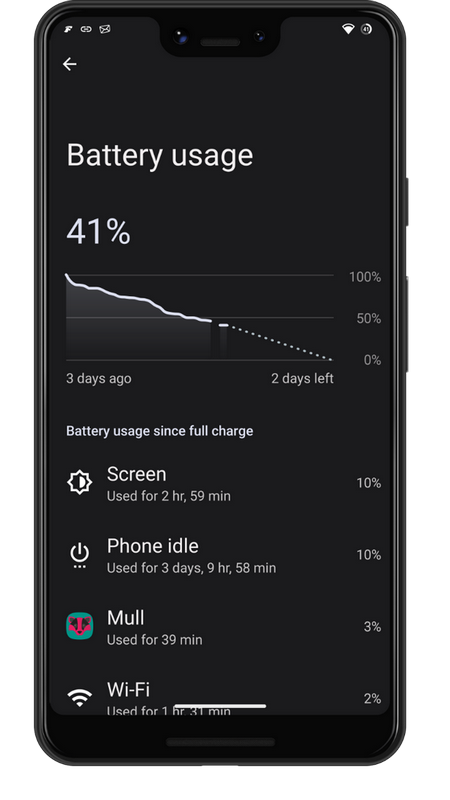 On well-configured devices, the battery often lasts several days.
Alternative to Google Play Services
| App | Website | Source code | Install |
|---|---|---|---|
| MicroG | 🌐 | 🛠️ | 🛍️ |
Tip:
Only install if you really need services that require access to your Google account!
Free (open) app stores
| App | Website | Source code | Install |
|---|---|---|---|
| F-Droid | 🌐 | 🛠️ | 🛍️ |
| Aurora Store | 🌐 | 🛠️ | 🛍️ |
| Obtainium | 🌐 | 🛠️ | 🛍️ |
Home screen (Launcher)
| App | Website | Source code | Install |
|---|---|---|---|
| Trebuchet | ⛔ | 🛠️ | Installed by default |
| Lawnchair | 🌐 | 🛠️ | 🛍️ |
Keyboard
Warning!
Do not install keyboard apps that are proprietary and/or require internet access! It does not matter how well the autocomplete works. Understand that it is unacceptable for it to send everything you type to someone’s server for the sole purpose of extracting your data. It does not even matter whether it has a “good” privacy policy or whether you trust the developer. Sending the data creates the risk of it being intercepted by a less trustworthy party.
It is best to stick with the keyboard provided with your operating system. Make sure it has no internet access.
Back in 2010, Google’s CEO Eric Schmidt said:
“With your permission you give us more information about you, about your friends, and we can improve the quality of our searches. We don’t need you to type at all. We know where you are. We know where you’ve been. We can more or less know what you’re thinking about.”
The full text is available in the BUSINESS INSIDER article.
An interesting study from April 2024, titled "The not-so-silent type: Vulnerabilities across keyboard apps reveal keystrokes to network eavesdroppers", shows just how vulnerable the keyboards of mobile devices with internet access are.
Web browser and extensions
| App | Website | Source code | Install |
|---|---|---|---|
| Mull + uBlock Origin | ⛔ + 🌐 | 🛠️ + 🛠️ | 🛍️ + 🛍️ |
| Firefox + uBlock Origin | 🌐 + 🌐 | ⛔ + 🛠️ | 🛍️ + 🛍️ |
| Brave | 🌐 | 🛠️ | 🛍️ |
Security
| App | Website | Source code | Install |
|---|---|---|---|
| NetGuard | 🌐 | 🛠️ | 🛍️ |
| PCAPdroid | 🌐 | 🛠️ | 🛍️ |
| Shelter | ⛔ | 🛠️ | 🛍️ |
| Cryptomator | 🌐 | 🛠️ | 🛍️ |
| Scrambled Exif | ⛔ | 🛠️ | 🛍️ |
| Exodus | 🌐 | 🛠️ | 🛍️ |
| Find My Device (FMD) | 🌐 | 🛠️ | 🛍️ |
Password manager and two-factor authentication (2FA)
| App | Website | Source code | Install |
|---|---|---|---|
| Bitwarden | 🌐 | 🛠️ | 🛍️ |
| Aegis | 🌐 | 🛠️ | 🛍️ |
VPN
| App | Website | Source code | Install |
|---|---|---|---|
| Wireguard | 🌐 | 🛠️ | 🛍️ |
Navigation
| App | Website | Source code | Install |
|---|---|---|---|
| Organic Maps | 🌐 | 🛠️ | 🛍️ |
| OpenStreetMap | 🌐 | 🛠️ | 🛍️ |
| GPSTest | ⛔ | 🛠️ | 🛍️ |
Sports and health
| App | Website | Source code | Install |
|---|---|---|---|
| Inner Breeze | 🌐 | 🛠️ | 🛍️ |
| Paseo | ⛔ | 🛠️ | 🛍️ |
Reading
| App | Website | Source code | Install |
|---|---|---|---|
| Book Reader | ⛔ | 🛠️ | 🛍️ |
| Librera Reader | 🌐 | 🛠️ | 🛍️ |
| LibreOffice Viewer | 🌐 | 🛠️ | 🛍️ |
| Feeder | 🌐 | 🛠️ | 🛍️ |
| Quote Unquote | ⛔ | 🛠️ | 🛍️ |
Note-taking
| App | Website | Source code | Install |
|---|---|---|---|
| Joplin | 🌐 | 🛠️ | 🛍️ |
Sync — Files, Calendars, Contacts
| App | Website | Source code | Install |
|---|---|---|---|
| Nextcloud | 🌐 | 🛠️ | 🛍️ |
| DAVx5 | 🌐 | 🛠️ | 🛍️ |
| LocalSend | 🌐 | 🛠️ | 🛍️ |
| App | Website | Source code | Install |
|---|---|---|---|
| K-9 Mail | 🌐 | 🛠️ | 🛍️ |
| FairEmail | 🌐 | 🛠️ | 🛍️ |
Instant messaging
| App | Website | Source code | Install |
|---|---|---|---|
| Conversations | 🌐 | 🛠️ | 🛍️ |
| Gotify | 🌐 | 🛠️ | 🛍️ |
Social networks
| App | Website | Source code | Install |
|---|---|---|---|
| Element | 🌐 | 🛠️ | 🛍️ |
| Mastodon | 🌐 | 🛠️ | 🛍️ |
Weather
| App | Website | Source code | Install |
|---|---|---|---|
| Breezy Weather | ⛔ | 🛠️ | 🛍️ |
Loyalty cards
| App | Website | Source code | Install |
|---|---|---|---|
| Catima | 🌐 | 🛠️ | 🛍️ |
Media — Audio, Video, Photos
| App | Website | Source code | Install |
|---|---|---|---|
| VLC | 🌐 | 🛠️ | 🛍️ |
| NewPipe | 🌐 | 🛠️ | 🛍️ |
| Fossify Gallery | 🌐 | 🛠️ | 🛍️ |
This list of mobile apps is not exhaustive. It is an example of how we can find open source apps whose goal is not to collect our data. A similar list, along with additional tips, can be found in the last section of this article — “Additional resources”.